
Home Interior Decor: AI Design
GRIMLAX TRADE, S.L.House & Home
4.121.00 Reviews
- Version
- 1.10.0
- Installs
- 100.00K
- Age Rating
- Everyone
Screenshots
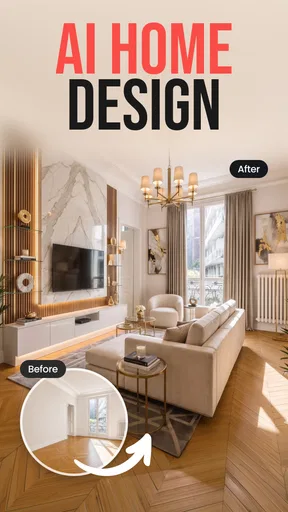
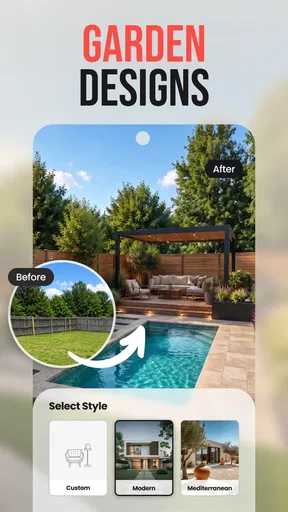
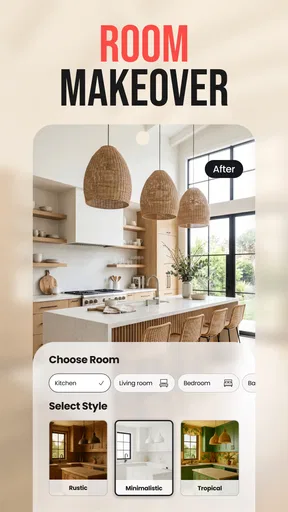
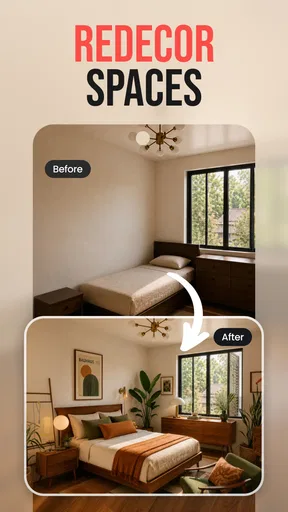
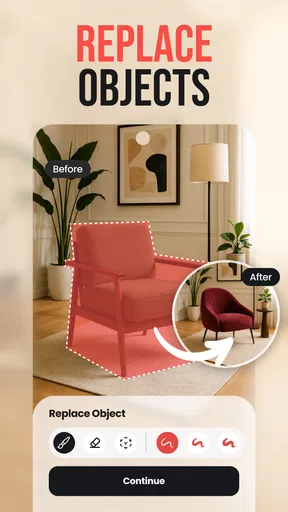
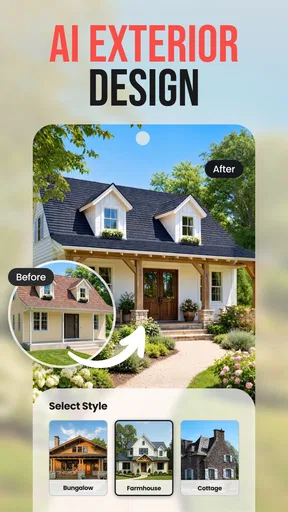
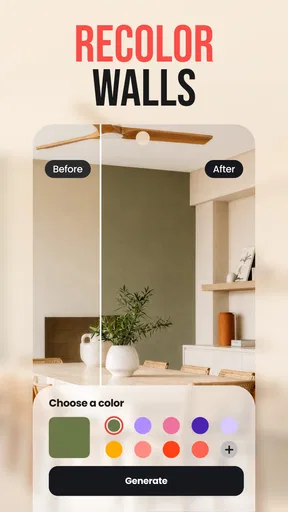
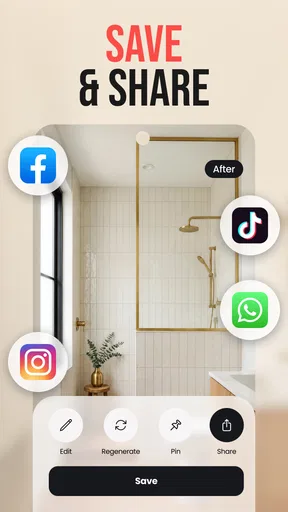
Our Review of Home Interior Decor: AI Design
 Analysis by Appyee
Home Interior Decor: AI Design is the kind of House & Home app I would open when I have a room that feels unfinished but no clear idea how to improve it. Instead of browsing endless furniture pages and trying to imagine how everything might look together, I can use it as a visual starting point for interior design and decoration ideas. The appeal is simple: take an existing room, explore a different direction, and decide whether the result is worth pursuing before spending money or moving heavy furniture.
I found the experience most useful when I treated the app as an idea generator rather than a complete renovation planner. Its AI approach can help turn a vague thought such as “this living room needs more warmth” into something easier to discuss and refine. That makes it approachable for first-time users, renters, homeowners, and anyone preparing for a small refresh. It is free to install, aimed at Everyone, and developed by GRIMLAX TRADE, S.L., so the barrier to trying it is low, although optional purchases range from $9.99 to $35.99 per item.
What to expect before you start redesigning
The first thing to understand is that this is not a replacement for an architect, an interior designer, or a detailed shopping and construction plan. I would not use an AI-generated room view to confirm whether a wall can be removed, whether a cabinet will physically fit, or whether a particular material is suitable for a humid bathroom. The visual result is best read as a direction: a way to compare moods, color relationships, furniture styles, and decorative possibilities.
That distinction matters because attractive images can create false confidence. A room may look spacious in a generated concept while the real layout remains narrow. A sofa may appear perfectly placed without accounting for door clearance, radiators, outlets, or the walking route through the room. My practical rule is to use the app for visual decisions first and physical decisions second. After finding a look I like, I would measure the space separately and check every purchase against the real room.
The app sits somewhere between a mood board and a quick visualization tool. Traditional inspiration boards are excellent for collecting references, but they often show rooms that bear little resemblance to your own. A standard furniture catalog gives you product information, yet it rarely answers the personal question, “Would this style work in my room?” This app’s value is in narrowing that gap. It lets me think about my own space instead of only admiring someone else’s.
Its current version is 1.10.0, and the app has reached over 100 thousand installs with a 4.1 average from more than 500 ratings. Those figures suggest a useful level of public interest, but I would still judge it by how well it handles my particular room and expectations. Reviews can indicate that people are finding value, while the visual quality of any individual result can depend heavily on the source image and the design brief I provide.
The best first goal is deliberately small
For a first session, I would not try to redesign an entire home. Pick one room and one decision. Perhaps the goal is to make a bedroom feel calmer, give a dated living room a lighter appearance, or explore whether a dining area could work with a more contemporary look. A narrow goal makes it easier to tell whether the output is genuinely helpful.
I also recommend deciding what must remain before asking for ideas. If the floor, sofa, television, or dining table is staying, keep that constraint in mind while reviewing the results. AI concepts can be inspiring, but they become less useful when every visible element changes. The strongest workflow is often to compare several directions while mentally separating what is realistic to keep from what is only useful as visual inspiration.
Getting through setup without overthinking it
After installing Home Interior Decor: AI Design, I would begin with the room that has the clearest problem rather than the room that is already easiest to photograph. A tidy but uninspiring room can be more informative than a dramatic space filled with clutter, because the app has a better chance of showing how style changes affect the existing structure. Before starting, remove temporary items that could distract from the room’s basic shape, such as laundry, loose packaging, or piles of toys.
A straightforward photo is usually a better starting point than an artistic one. I would stand far enough back to show the floor, walls, main furniture, and the relationship between them. Keeping the camera level helps me judge the result more fairly later. Strong shadows, mirrors, very dark corners, and objects blocking most of the room can make any visualization harder to interpret, so a calm, readable image is preferable to a dramatic shot.
Once the room is ready, I would describe the outcome in ordinary language. “Make this room brighter and less cluttered” is a useful direction, but it leaves many choices open. A more practical brief might mention the desired feeling, the elements that should remain, and the type of change I am considering: warmer colors, simpler decoration, a more modern appearance, or a softer bedroom atmosphere. This does not require design vocabulary. Clear priorities are more valuable than impressive-sounding style names.
One helpful habit is to separate the visual problem into layers. First think about the big mood: light, calm, warm, dramatic, natural, or clean. Then consider the furniture character, and only after that think about accessories. If I begin with small decorations, I can lose sight of the room’s main issue. If the layout feels cramped, a new cushion color will not solve it. If the room feels cold, changing every piece of furniture may be unnecessary when the real answer is a warmer palette and better visual balance.
New users may wonder whether they need to know exactly what style they want before using the app. I do not think so. In fact, uncertainty is one of its more practical use cases. I can start with a broad preference, compare the direction with the room I know, and then identify what I like or dislike. The process turns “I want something nicer” into more specific observations such as “I prefer lighter wood,” “I do not want a stark white wall,” or “I need the seating area to feel less crowded.”
How to reach a meaningful first result
The first successful action should be something I can act on, not merely an image I enjoy looking at. After generating or viewing a room concept, I would choose one visible change that fits the real space. That might be reducing the number of decorative objects, shifting the color balance, replacing one dominant piece, or creating a clearer focal point. Writing down that single takeaway prevents the session from becoming an endless scroll through attractive alternatives.
For example, imagine I am preparing a living room for everyday family use. The current space contains a large sofa, a television unit, several small decorations, and a dark wall color. I might use the app to explore a lighter, calmer direction while keeping the sofa as an anchor. If the result makes the room feel more open, I would not immediately copy every detail. Instead, I would test the idea at home by temporarily removing some objects, moving a lamp, and checking whether the room already feels improved. The app has then helped me make a low-cost experiment.
This is also where I see an advantage over browsing generic room photos. A catalog or social media board can show me a beautiful arrangement, but it may not help me understand what to change in my own space. With a room-specific visualization, I can focus on relationships: whether the wall color competes with the furniture, whether the floor looks too heavy, or whether the decorative accents are drawing attention away from the main seating area.
A second useful workflow is comparing by one variable at a time. I would keep the basic room and overall goal consistent, then examine a warmer version, a lighter version, or a simpler version. If I change the style, layout, colors, and accessories all at once, I cannot tell which choice improved the result. Even without formal design training, this simple comparison method makes the app more informative and reduces the temptation to chase whichever image looks most dramatic.
For a rental home, the app can be especially useful when I focus on reversible changes. I can explore rugs, lighting moods, wall decoration, textiles, and furniture arrangements without committing to permanent work. For a new home, it can help establish a visual direction before buying several pieces. For a family room, I would use it to compare atmosphere and organization rather than to pursue a showroom-perfect image that may be difficult to maintain.
Where first-time users can get confused
The most common confusion is likely to come from treating a generated concept as a precise preview. I would expect the app to be more persuasive for broad style and decor decisions than for exact dimensions. A chair that appears to fit may be too wide in real life, and a walkway that looks comfortable may be inconvenient once people use the room. I would keep a tape measure and a simple floor sketch involved whenever a decision affects circulation or a major purchase.
Another point of friction is the difference between “inspiration” and “instruction.” The app can suggest a visual direction, but it does not remove the need to decide what is affordable, durable, child-friendly, pet-friendly, or easy to clean. A pale, uncluttered concept may look appealing, yet a household with pets or young children may need different fabrics and storage choices. I would use the image to ask better questions, not to bypass those practical checks.
It is also easy to overvalue novelty. An unusual room can look exciting because it is far from the current space, but that does not mean it will feel comfortable after a week. I prefer to look for changes that solve a real problem: better visual balance, a clearer focal point, less heaviness, or a more coherent palette. If a result only looks different, I would treat it as entertainment. If it helps explain why the room feels wrong, it becomes useful design guidance.
Because the app is free to download but includes optional purchases priced from $9.99 to $35.99 per item, I would pay attention to the point at which the free experience stops being enough for my project. A first-time user should decide in advance whether the app is being used for casual inspiration or for a more sustained redesign process. I would not purchase anything simply because a polished result creates urgency. First confirm that the available workflow genuinely helps with the room I am working on.
The Everyone age rating makes the app approachable for households, but younger users should still understand that visual concepts are not automatically safe or practical plans. A child might enjoy imagining a themed bedroom, while an adult should check furniture stability, access to outlets, window safety, and the suitability of materials before making changes. That is not a weakness unique to this app; it is a necessary boundary for any visual design tool.
Using the results with ordinary alternatives
Compared with a paper mood board, this app is faster at connecting inspiration to a particular room. A mood board remains better when I want to collect exact products, fabric samples, paint cards, and measurements in one place. I would use both when planning seriously: the app for visual direction, then a physical or digital checklist for decisions that must be accurate.
Compared with a general image search, the app should save time by keeping attention on interior spaces rather than making me assemble a design from unrelated examples. Search is still stronger when I need a specific product, a precise installation method, or advice from people who have used a material in real conditions. The two approaches work well together, but they answer different questions.
Compared with hiring a professional, Home Interior Decor: AI Design is far more accessible for early exploration, especially when I am not ready to pay for a consultation. A designer is the better choice when the project involves structural changes, complex lighting, custom storage, accessibility needs, or a large budget where mistakes would be expensive. I see this app as a useful first conversation with myself, not a substitute for technical expertise.
It also differs from a conventional furniture-shopping app. A shopping app begins with products and asks where they might go. This experience begins with the room’s appearance and asks what direction could improve it. That makes it valuable before I know what I want to buy. Once I reach the shopping stage, however, I would switch to retailers and manufacturer information to verify dimensions, materials, care requirements, delivery details, and compatibility.
Who will get the most from it
I would recommend it to someone who has difficulty imagining change. If you keep staring at the same room and cannot decide whether to go lighter, warmer, simpler, or more modern, visual comparisons can make the decision less abstract. It is also a good fit for people preparing a small makeover, renters seeking reversible ideas, and homeowners who want to discuss options with a partner or family member without relying only on verbal descriptions.
It may be less suitable for someone who already has a precise technical plan. If you need exact floor plans, construction documentation, product-level specifications, or professional compliance guidance, a dedicated design program or qualified specialist will be more appropriate. I would also skip it as a primary tool if my main goal is to find the cheapest matching furniture, because visual inspiration does not automatically provide the purchasing details needed to complete a room.
My strongest recommendation is to keep the first session practical: choose one room, take a clear photo, describe one desired improvement, and select one realistic change from the result. That path gives a beginner a meaningful success without demanding design knowledge. It also protects against the app’s biggest temptation, which is confusing a beautiful possibility with a finished plan.
My verdict after using it as a planning companion
Home Interior Decor: AI Design works best when I use it to move from indecision to a short list of visual possibilities. Its AI-centered approach makes interior ideas easier to imagine in the context of a real room, and the free entry point makes experimentation comfortable. I especially like the potential for low-risk tests: change the mood, simplify the decoration, or rethink one area before committing money or effort.
The limitations are just as important. Generated room concepts should not be trusted for exact fit, construction decisions, or a complete buying plan. Optional purchases also mean that a free installation may not be the end of the cost if I want to continue with paid items. For serious renovations, I would combine the app with measurements, product research, and professional advice where necessary.
Overall, I would suggest giving it a try if you want a friendly first step into AI interior design and need help discovering what your room could become. The app is most valuable when it produces a decision I can test in real life, not when it simply produces the prettiest picture. Used with that mindset, Home Interior Decor: AI Design is a practical source of direction for everyday decorating, especially for a first project that needs inspiration before it needs a shopping list.
Verdict
Strengths of Home Interior Decor: AI Design
- Generates quick room makeover ideas from uploaded photos.
- Offers multiple interior styles for different tastes and spaces.
- Useful for visualizing color and furniture changes before renovating.
- Simple interface makes it accessible to users without design experience.
- Can provide inspiration when planning a room refresh on a budget.
Limitations of Home Interior Decor: AI Design
- AI results may distort furniture, windows, or room proportions.
- Some styles and design features may require a subscription.
- Uploaded photos may raise privacy concerns for cautious users.
- Suggestions can look generic without detailed customization options.
- Results depend heavily on lighting and image quality.
Other Releases by GRIMLAX TRADE, S.L.
View All
AI Cleaner - Phone Cleaner
Tools4.3
Similar Picks in This Category
View All
Universal TV Remote Control
CodeMatics Media Solutions3.9

AlfredCamera Home Security app
Alfred Systems Inc.4.7

Planner 5D: AI Home Design
Planner 5D4.5

Universal Tv Remote-Cast to TV
One Music Player4.1

Zillow: Homes for Sale & Rent
Zillow Group4.8

99acres Buy/Rent/Sell Property
infoedge.com4.3
Frequently Asked Questions
What is Home Interior Decor: AI Design, and how does it work?
Home Interior Decor: AI Design is an app that uses artificial intelligence to help visualize interior decorating ideas. You can generally upload or select a photo of a room, choose a preferred style, and let the app generate redesigned versions with different furniture, colors, layouts, and decorative elements. It is mainly intended for inspiration and planning rather than creating a precise architectural or construction plan.
Can Home Interior Decor: AI Design redesign any room or property?
The app is designed to provide ideas for common interior spaces such as living rooms, bedrooms, kitchens, dining areas, offices, and sometimes bathrooms or outdoor areas. Results can vary depending on the quality, lighting, angle, and organization of the uploaded image. Rooms with clear walls and visible furniture usually produce more useful results, while cluttered or poorly lit photos may lead to less realistic designs.
Are the AI-generated designs accurate enough to use for remodeling?
The generated images can be helpful for exploring styles and imagining possible changes, but they should not be treated as exact remodeling instructions. Furniture dimensions, room measurements, structural limitations, electrical points, and material availability may not be represented correctly. Before purchasing products or starting construction, compare the suggestions with real measurements and consult a professional designer, contractor, or architect when necessary.
Is Home Interior Decor: AI Design free to use?
The app may offer free features, limited design generations, or a trial period, while advanced styles, higher-quality results, unlimited creations, or additional tools may require in-app purchases or a subscription. Pricing and included features can change according to the platform and region. It is important to review the payment screen, renewal terms, and cancellation policy before activating any premium plan.
What should I know about privacy when uploading room photos?
Before uploading images, review the app’s privacy policy and permissions carefully. Room photos can reveal personal belongings, family information, addresses, or other sensitive details, so avoid including anything you do not want processed or stored. If possible, remove identifiable objects and check whether images are used only to generate designs or may also be retained for service improvement.
